What is an H1 tag on a website? You constantly hear people say “H1 tags are important,” but what does important actually mean? And does it still matter in 2026, when search is shaped by AI summaries, voice results, and systems that care far more about clarity than cleverness?
The answer is yes, but not because an H1 is some kind of ranking trick. The real role of an H1 is much quieter, and much more foundational.
An H1 isn’t decorative. They establish context.
When I review websites, especially those built with DIY drag-and-drop templates or visual page builders, I see the same pattern over and over again. Headings are chosen based on how they look, not what they’re communicating. Text is styled to feel impactful, but the structure underneath is often doing the opposite.
It’s the primary signal that tells search engines, accessibility tools, AI systems, and real humans what a page is actually about, before anything else has a chance to load, scroll, or impress.
As search continues to move toward summarized answers and context-driven results, that clarity matters more than ever.
The upside? This is one of the simplest on-page elements to get right, and one of the easiest places to quietly strengthen your site’s visibility, usability, and long-term performance without chasing trends or gaming algorithms.
If your website looks great but isn’t showing up in search, or visitors don’t seem to understand what you do right away, there’s a good chance the issue starts at the top of the page.
Your H1.
Most website owners treat the H1 as a design choice or a branding moment. In reality, it’s one of the most important structural elements on your site, for SEO, accessibility, AI search, and human clarity.
In 2026, that matters more than ever.
What Is an H1 Tag on a Website?
The Technical Definition
H1 stands for “Heading Level 1” in HTML. It’s the primary heading of a web page that tells both humans and machines what a specific page is about. It provides essential context for Google to index and categorize the page accurately. Screen readers use H1 tags to help visually impaired users quickly understand the page’s purpose and navigate its structure. It is the single most important HTML element on a webpage.
An H1 is the primary heading of a web page. It tells:
Search engines what the page is about
Screen readers how the page is structures
AI tools how to summarize the content
Visitors whether they are in the right place
If someone read only one line on your page, your H1 should communicate the main topic immediately. It’s not decorative, it establishes context.
Why Are H1s Important for SEO in 2026?
Search engines no longer rely on keywords alone. They rely on context, structure, and clarity. When you mark something as an H1 in your code, you are telling search engines, screen readers, and AI systems: “This is what this page is about. This is the most important heading. Everything else on this page relates to this topic.”
Search engines analyze:
Page structure
Content hierarchy
Context relationships
User experience signals
Your H1 helps define:
The primary topic
The page’s intent
How the rest of your headings relate to it
But SEO isn’t the only reason H1s matter now. AI-generated search results and voice answers rely heavily on heading clarity to extract and summarize information.
If your H1 is vague, poetic, or stylistic without context, your page becomes harder to interpret, even if the content underneath is strong.
Clear structure improves:
Search visibility
AI inclusion
Accessibility
Usability
That’s not hype, that’s architecture.
How Many H1s Should a Page Have?
So you may be asking yourself how many H1s can my page have?
The best practice for most websites today is still:
One page = one H1
While modern HTML technically allows multiple H1s, most website platforms and page builders don’t implement this cleanly. Multiple H1s often create more confusion than clarity, especially for small business and creative websites. They dilute your message.
If you have three H1s on a page, you are telling search engines: “This page is about three equally important things.” You’ve lost the clarity of “This is THE topic of this page.”
AI systems trying to understand your page don’t know which H1 represents the primary topic. They have to guess or try to synthesize all three.
This is especially common in DIY website builders like Squarespace, Wix, and Showit.
Users don’t realize they are creating H1s – they just know they like the “Large Heading” styling. So they use it six times on a page because it looks good. Behind the scenes, every one of those is generating an H1 tag.
Using one H1 per page:
Reduces ambiguity
Simplifies accessibility navigation
Strengthens topical focus
Makes audits easier
What Is the Correct H1 Structure for a Web Page? (Best Practices for 2026 and Beyond)
Using a single, clear H1:
keeps page intent obvious
avoids accessibility issues
makes audits and updates easier
helps AI tools summarize content correctly
If you’re unsure how your platform handles headings, one H1 per page is the safest and clearest approach. Headings create a hierarchy, not just a visual layout.
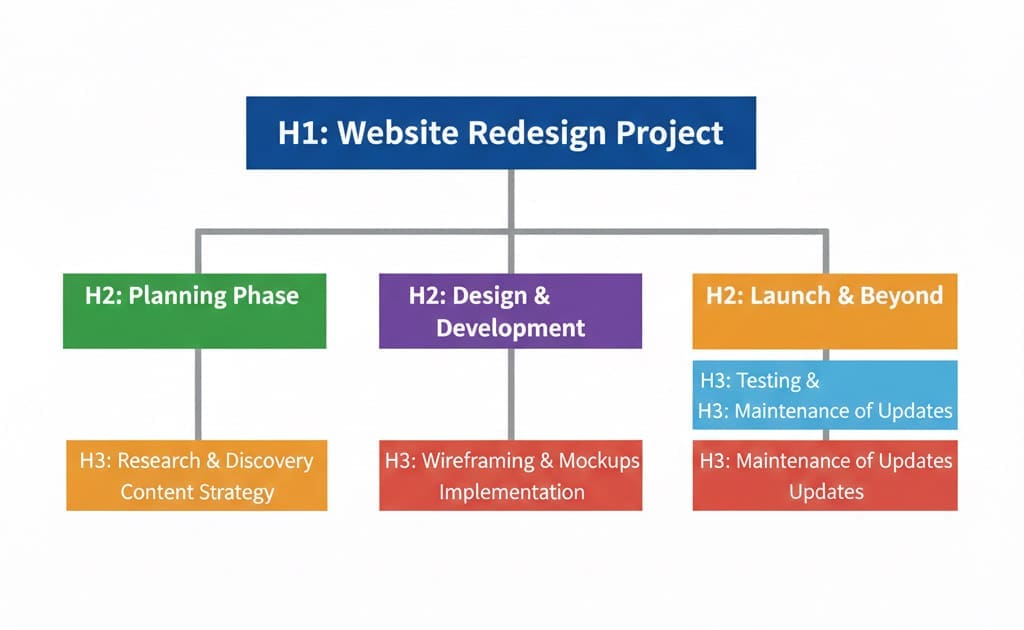
A clear structure looks like this:
H1 – the main topic of the page
H2s – major sections that support the H1
H3s – subpoints within those sections
Headings should flow logically, not stylistically.
You shouldn’t choose heading levels based on font size or spacing – those can always be adjusted with design. This same structural thinking also applies taxonomy pages. Learn how your WordPress blog categories and tags affect SEO too.
Structure comes first. Styling comes second.
Common H1 Mistakes That Hurt SEO
These are issues I see constantly when reviewing websites:
Using the logo as the H1
Hiding the H1 for design reasons
Using a vague phrase with no context
Keyword stuffing the H1 unnaturally
Using different H1s on desktop and mobile
Changing the H1 dynamically or rotating text
Adding multiple H1s just to style text
Individually, these may seem minor. Together, they make your site harder to understand for both users and search engines. Understanding how your site structure affects search visibility is a vital thing for all small business owners.
What Makes a Good H1?
A strong H1 does three things well:
Clearly describes what the page is about
Matches what someone is searching for
Sounds natural and human
Examples:
❌ Luxury Newborn Experience
✅ Newborn Photography in Dallas for Families Who Want Calm, Guided Sessions

❌ Welcome
✅ Website Strategy and SEO Support for Creative Small Businesses
Clever phrasing can live elsewhere on the page.
Your H1’s job is clarity.
Do H1s Matter for AI Search and Accessibility?
Yes, and this is where many older SEO articles fall short. AI tools use headings to:
summarize pages
extract answers
determine relevance
decide when to surface your content
Screen readers also rely heavily on heading structure to help users navigate a page. A clear, descriptive H1 improves:
accessibility
usability
AI interpretation
long-term search performance
When your H1 is vague, poetic, or purely visual, all of that breaks down.
How to Check and Fix Your H1s
You don’t need advanced tools to start. Ask yourself:
Does this page have exactly one H1?
Does it clearly describe the page content?
Would a stranger understand it instantly?
Does the content below actually support it?
If the answer to any of those is “not really,” that page likely needs refinement.
If you are unsure whether your H1 is helping or hurting your visibility, I created a simple one-page checklist you can use. It walks you through:
Most website problems aren't actually website problems. They're clarity problems disguised as design issues. Learn how to diagnose what your website actually needs—strategy, implementation, or education—so you stop rebuilding the same house with prettier wallpaper.
Some of my best ideas don’t show up when I am actively trying to write them. They show up later – when I am in my car rushing to pick up my son because I had to get just “one more thing finished” before I left, knowing full well I can’t actually stop and put […]
Most people treat a client complaint as a problem to manage and don’t always know how to handle client complaints. I’ve learned to treat them as data to learn from. There’s a moment every small business owner has experienced: a client pushes back, expresses frustration, or sends the email you didn’t want to receive. The […]




Be the first to comment